
AUTOVID · AI VIDEO STUDIO
AI video creation, from idea to completion, in one workflow.
From script creation to editing, thumbnails, and uploading,
AUTOVID brings repetitive production steps into one organized pipeline.
Start after installation · Build a production workflow without complex editing knowledge
Actual Generated Videos
Automatically generated results without manual editing
The output language can be changed in the program.
Reduce repetitive video production work with AUTOVID.
Experience a production pipeline for structure, visuals, timing, and upload prep.
AI SHORTS
Create videos step by step with on-screen guidance
From entering a topic to reviewing scripts and images, choosing subtitles and motion, and completing the video, the creation wizard guides you in order. No professional editing skills are required.
MARKETING VIDEOMarketing video creation
Add the descriptions, images, and video clips for the product or service you want to promote. AUTOVID uses them to automatically create product ads, service introductions, promotional Shorts, and campaign videos.
When video production and upload prep keep getting pushed back
Too many steps
Planning, editing, thumbnails, and upload settings can stretch the whole production workflow.
The quality is disappointing
When you rush, it is harder to check structure, subtitles, thumbnails, and upload settings carefully.
Upload setup is complex
Titles, scripts, length, cut structure, descriptions, and tags need to be organized every time.
Too much repetitive work
Detailed production tasks can take attention away from content ideas and review.
Turn ideas into a publish-ready video workflow.
AUTOVID is built for creators and marketers who need a steadier way to produce and upload videos.
- Automated workflow for YouTube Shorts and long-form production
- Script drafts, scene structure, thumbnails, and upload prep in one flow
- Reduce repetitive work while keeping final review and edits in your hands
Create videos step by step with on-screen guidance
From entering a topic to reviewing scripts and images, choosing subtitles and motion, and completing the video, the creation wizard guides you in order. No professional editing skills are required.
01
Enter or choose only what each screen asks for
Enter a topic or source text that you created or have rights to use, and AUTOVID suggests a script draft and scene structure.
02
Review and easily edit the generated script and images
Review the script, images, and template structure, then adjust what you need.
03
When setup is complete, AUTOVID creates the video automatically
Handle voice and subtitle timing, screen composition, thumbnail generation, and YouTube upload settings in one flow.
Reduce repetitive video production work with AUTOVID.
Experience a production pipeline for structure, visuals, timing, and upload prep.

Shorts/long form template function
Use common video formats as templates to reduce structure work and start faster.

Automatic thumbnail creation function
Generate thumbnail drafts from the title and video content to reduce first-screen prep time.

One-click YouTube upload
After reviewing the completed video, users can upload it to YouTube and set the title, description, and tags in one flow.
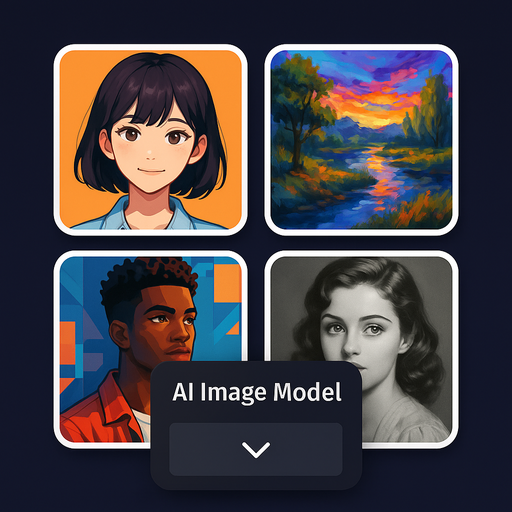
Scene visual asset options
Generate and select backgrounds, B-roll, and thumbnail visuals that match your project while keeping final review in your hands.

Automatic setting of audio and subtitle timing
It analyzes the script and audio and automatically adjusts the subtitle timing, so you don't have to manually adjust each line.

Script generation with YouTube-friendly structure
Based on topic and target format, AUTOVID suggests a script structure designed for a clearer viewing flow.
Marketing video creation
Add the descriptions, images, and video clips for the product or service you want to promote. AUTOVID uses them to automatically create product ads, service introductions, promotional Shorts, and campaign videos.
Create for global audiences in 30 languages
Use localized workflows across 30 languages and configure channel language and voice settings to create Shorts and long-form videos for different countries and regions.
Microsoft Store user reviews
KO → EN
Best program for video creation
“With a small idea and a few settings, you can create long-form and short-form videos very easily.”KO
영상 제작의 최고 프로그램어렵게 유튜브 강의 비싸게 듣지 마세요 설정만 해주고 작은 아이디어만 있으면 롱폼 쇼폼 정말 쉽게 가능합니다 정말 이런걸 개발하셨다니 감사합니다 잘 사용하겠습니다
KO → EN
An app that helps anyone become a YouTuber
“It is easy to use, communication is great, and I especially like the continuous updates.”KO
누구나 유튜버가 될수 있게 해주는 앱사용법도 간단하고, 소통도 잘되어 너무 만족합니다. 지속적인 업데이트가 되는게 가장 좋네요. 감사합니다.
KO → EN
The intuitive interface makes it easy to learn
“Splitting a long-form video into Shorts was especially convenient and saved me a lot of time.”KO
인터페이스가 직관적이라 금방 적응됩니다.처음 써보는 프로그램이라 걱정했는데, 생각보다 사용법이 단순해서 금방 익숙해졌습니다. 롱폼 영상 만들다가 쇼츠로 나누는 작업이 특히 편했고, 시간도 꽤 절약됐어요. 완전 자동이라고 해서 기대를 너무 크게 하면 아쉬울 수 있지만, 기본 틀 잡는 용도로는 충분히 만족스럽습니다. 마지막에 조금만 손보면 결과물도 자연스럽게 잘 나옵니다.
KO → EN
The joy of creating and uploading videos myself
“It is simple and gives me confidence that I can do it too.”KO
일단 직접 만들어서 올릴수 있다는 기쁨너무 좋습니다. 간편합니다. 나도 해볼수 있다는 자신감이 드네요
KO → EN
A convenient app
“It maintains character consistency and creates 30-minute long-form videos without a drop in quality.”KO
편리한 앱입니다.무엇보다 캐릭터 일관성을 유지해주는게 좋구요. 30분짜리 롱폼도 품질저하없이 잘 만들어줘서 정말 편하게 사용중입니다.
KO → EN
Create YouTube videos simply and conveniently
“It supports both long-form and short-form videos, so I recommend it to YouTube creators.”KO
간단하고 편리하게 유튜브 영상 제작이 가능합니다판매자님도 빠른 대응으로 응답해주시고, 무엇보다 강점인 프로그램을 지속적으로 업데이트, 개발해주신다는 점이 좋습니다. 롱폼이나 쇼폼 모두 가능하기에, 유튜브하시는 분들께 추천드립니다
KO → EN
A new world of YouTube video automation
“Enter key keywords and AI organizes the overall flow and creates the video.”KO
유튜브 영상 자동화의 신세계과거에는 스크립트 작성부터 자료 화면 수집, 배경음악 선정까지 일일이 수작업으로 진행했습니다. 하지만 이제는 핵심 키워드만 입력하면 AI가 전체적인 흐름을 잡고 영상을 만들어주니 신세계 입니다.
KO → EN
The best automation program
“The program is intuitive, very easy to use, and produces excellent quality.”KO
최고의 자동화 프로그램입니다.몇가지를 써봤지만 이게 제일 좋은것 같아요~ 퀄리티도 엄청좋아요. 프로그램도 직관적이어서 사용하기도 너무 편합니다. 계속계속해서 서비스가 되었으면 좋겠어요~~
EN
This App is Crazy Awesome!
“I’m honestly amazed at how easy AUTOVID is to use! Just type in a topic, and the app does everything—crazy fast, too.
It even adds subtitles and narration for you.
The Shorts feature is awesome for making quick videos, and it saves me so much time.
Definitely recommend if you want something that makes video creation super simple!”If editing and upload prep feel heavy every time
Reducing repetitive production steps can make your content operation simpler.
Manage scripts, visuals, thumbnails, and upload prep in one AUTOVID pipeline.